
A step-by-step protocol for tracking Voiceitt progress and building the WER comparison data districts need to approve funding.
Sep 20, 2026 · by Rachel Khasky-Levy SLPD CCC-SLP
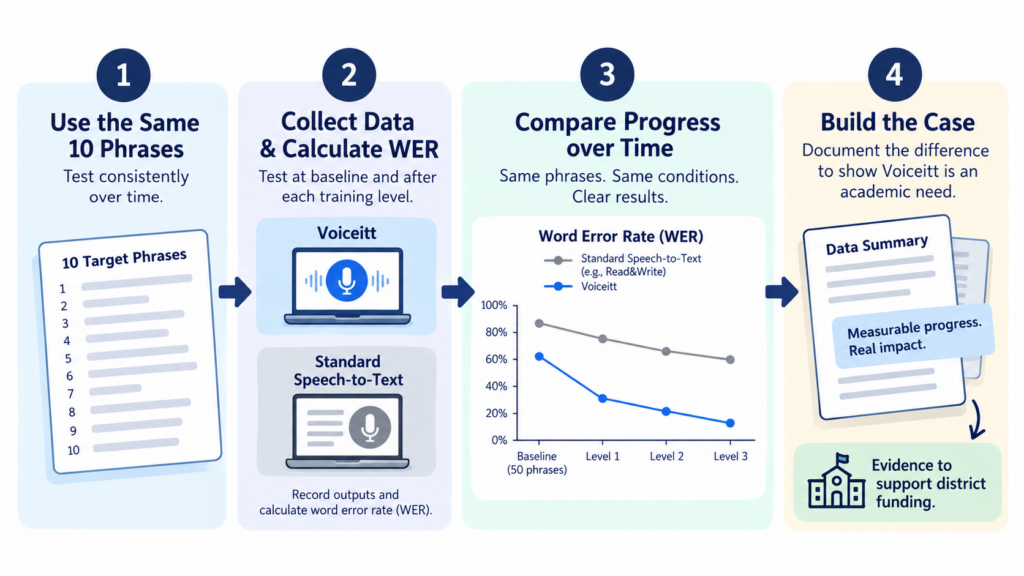
In short: Voiceitt gets more accurate as it learns a student’s voice, but you need clean, consistent data to prove it. Test 10 fixed phrases using dictate mode, wait two hours after each new training level before re-testing (the model needs time to update), and calculate word error rate (WER) at every session. Then run the same phrases through the district’s existing speech recognition tool (like Read&Write) for a direct comparison. The gap between the two numbers, documented over time, is what turns “this seems to help” into a data-backed case that Voiceitt is an academic need worth funding.
When teams trial Voiceitt, one of the most important questions is not whether progress happens, but how to measure it in a controlled, defensible way. Because Voiceitt improves as it learns a user’s unique speech patterns, meaningful data collection depends on consistency, timing, and clean input.
1. Establish a true baseline (after the first 50 phrases)
Voiceitt requires 50 training phrases before Speak and Dictate modes become available. These first 50 phrases are not expected to yield strong accuracy. Their purpose is to establish an initial baseline.
Critical timing note: Voiceitt updates its speech model only after a level is completed, and this is also true after the initial 50 phrases. The model update takes approximately two hours.
Best practice:
- Complete the first 50 phrases in the web/desktop application
- Wait at least two hours after finishing the 50 phrases (or test at the next session/day)
- Then collect your baseline data
- Do not judge performance immediately after the 50th phrase
This ensures your baseline reflects the updated model rather than the pre-training state.
2. Select fixed target phrases (and what to avoid)
Before collecting any data, identify 10 spontaneous phrases the student commonly uses in daily routines. These should be functional, natural, and representative of how the student communicates in real life.
Examples:
- “I like strawberry shortcake.”
- “I need help.”
- “I want to go outside.”
Use the same 10 phrases every time data is collected. This consistency is essential for comparing accuracy across sessions, training levels, and across tools.
Avoid proper nouns and personal vocabulary (names, school or classroom names, specific locations, personalized shortcut phrases) in target phrases. Personal vocabulary can artificially inflate accuracy and mask true model improvement. Select phrases that rely on common vocabulary only, and introduce personal vocabulary only after stable improvement has been documented.
3. Collect data in Dictate mode (controlled recording)
Dictate mode is the recommended environment for data collection because it provides full control over when Voiceitt listens and stops listening.
Follow this sequence exactly:
- Prompt the student before activating Voiceitt. Verbally cue the phrase first, for example: “When you’re ready, say: I like strawberry shortcake.”
- Wait until the student is ready to repeat the phrase. This ensures that only the student’s voice is captured.
- Press the large blue “Speak” button to begin listening only when the student is ready to speak.
- Allow the student to say the phrase once, without interruption.
- Press the large blue “Stop Listening” button immediately after the phrase is complete.
- Repeat this process for all 10 target phrases.
This controlled sequence prevents recording of clinician speech, background voice contamination, and inconsistent timing across trials. Clean input leads to meaningful data.
4. Document the output and calculate word error rate (WER)
After completing all 10 phrases, use the Copy button in dictate mode and paste the output into a data-tracking document that includes the original target phrases, the Voiceitt output for that session, and the date and training level.
This is also where you calculate WER, and it’s simpler than it sounds. WER is just the percentage of words that came out wrong.
WER = (number of word errors ÷ total number of words in the target phrases) × 100
To find word errors, compare the Voiceitt output word by word against what the student actually said. Count any word that’s wrong, missing, or added that shouldn’t be there.
Example: if your 10 target phrases total 40 words, and 20 words came out wrong in the Voiceitt output, that’s a 50 percent WER for that session.
Track WER at every session alongside your notes on error patterns. This turns “the student seems to be doing better” into a documented, defensible number a district can evaluate.
5. Run the same phrases through standard speech-to-text for comparison
This step is what makes your data usable for a funding case. Using the exact same 10 target phrases, have the student attempt the same task using a standard speech recognition tool the district already has access to, such as Read&Write’s Talk&Type feature or built-in Chromebook dictation.
Follow the same controlled recording process described above. Document the output the same way, and calculate WER using the same formula.
Now you have two numbers for the same student, saying the same words, on the same day: WER using standard speech recognition, and WER using Voiceitt.
Calculate the percent reduction:
Percent reduction = ((standard WER − Voiceitt WER) ÷ standard WER) × 100
Example: if standard speech-to-text produces a 90 percent WER and Voiceitt produces a 50 percent WER for that same student, that’s roughly a 44 percent reduction. These numbers will vary by student and need to be measured individually rather than assumed.
This comparison is the core of your case to the district. It shows the tool the district already provides is not meeting the student’s communication access needs, and it shows by how much Voiceitt closes that gap. That’s the difference between a preference and a documented academic need.
6. Re-test only after subsequent level updates
After the baseline is established, the same rule applies at every level. Voiceitt updates its speech model only after a level is completed, and each update takes approximately two hours.
For every new level: complete the recordings needed to reach the level, wait at least two hours (or test at the next session/day), and re-test the same 10 phrases in dictate mode. Testing immediately after reaching a level will not reflect the updated model.
7. Repeat at each level using the same criteria
At every new level, test the same 10 phrases, calculate WER, and compare to baseline and prior sessions. Note newly recognized words and remaining error patterns. Progress is often incremental and may show up as fewer missing words, increased consistency across attempts, or more complete sentence output. These small gains are clinically meaningful and belong in the record, even before the student reaches a fully functional level.
8. Continue recording when time allows
If the student is engaged and time permits, continue recording beyond the minimum required for a level. Additional recordings will be incorporated once the next level is reached. There is no downside to continued recording.
9. Control the recording environment
To maintain data integrity, ensure only the student’s voice is recorded, reduce background noise, and encourage natural speech rather than over-articulation. Avoid relying solely on read speech. If intelligibility changes throughout the day, intentionally capture samples during less optimal times as well. Voiceitt benefits from learning real-world variability, and this variability also strengthens your data, since it shows performance under realistic conditions rather than best-case conditions only.
10. Expand beyond the desktop app when ready
Once dictate mode accuracy reaches a functional level, begin using the Chrome extension in Google Docs, Slides, and Classroom. Training and data collection should remain in the desktop/web app. The extension is for real-world use, not measurement.
Building the funding case
By the time a student reaches a familiar-listener level, you’ll have a session-by-session WER record for Voiceitt, plus at least one direct comparison against the standard speech recognition tool the district already provides. That comparison is your strongest evidence. It shows objectively, in the district’s own terms, that the tool currently available does not give this student functional communication access, and that Voiceitt measurably does.
This same tracking method sets the student up for the next phase: translating documented WER improvement into IEP goals once training reaches a stable level (see the IEP goals blog).
Final takeaway
Voiceitt training is not a pass/fail event. It is a data-driven, iterative process. When teams control what is said, when recording starts and stops, when testing occurs, and how performance compares to the tools already in place, progress becomes visible, measurable, and defensible. This structured approach allows teams to confidently determine whether Voiceitt is improving access for a student over time, and to make the case that continued access is a need, not a nice-to-have.
To obtain a quote or learn more about different funding pathways and our pricing model, please reach out to support@thebabelgroup.com